Sprite Sheet Tool
  • AI Generator
  • Character Design
  • Pricing
Sprite Sheet Tool

Free browser-based sprite sheet workspace for 2D game developers.

Email

© 2026 Sprite Sheet Tool All Rights Reserved.

Links
  • Pricing
  • Sprite Sheet Maker
  • Sprite Sheet Splitter
  • Animation preview
  • Sprite sheet to GIF
  • Texture Atlas Generator
  • GIF to Sprite Sheet
  • Unity Sprite Sheet Maker
  • Godot Sprite Sheet Maker
  • Contact
Legal
  • Privacy Policy
  • Terms of Service
  • Refund Policy
  • Cookie Policy
Resources
  • Guides
  • Blog
  • What’s new
Português (Brasil)

AI Pixel Art Character Generator

Turn a text description into one full-body 96 × 96 pixel sprite with a transparent background. Download the PNG or use it as the reference for a four-direction walk.

From text to a playable Godot project: 2 credits for the character and 5 for Standard Walk (7 total). Optional Idle uses 5 more credits. A completed purchase unlocks generation.

See a recorded Standard walk exampleTry the walk and sprite sheet generator

Pixel art character examples

Fox Ranger

Full-body orange pixel art fox ranger with a teal cloak and brown boots

See how a teal cloak and orange fur read on a small character.

View prompt

Small adult fox ranger, warm orange fur, cream muzzle, two pointed ears, short teal hooded cloak, ochre tunic, brown belt and brown ankle boots, empty hands, no weapon, no tail visible from the front

Village Blacksmith

Full-body pixel art village blacksmith wearing a dark apron and boots

Try a human NPC with one distinctive tool.

View prompt

A sturdy village blacksmith with a dark leather apron over a rolled-sleeve cream shirt, charcoal trousers, brown boots and one small hammer held at their side.

Clockwork Sentry

Brass pixel art clockwork sentry with a blue eye and red shoulder armor

Try a mechanical silhouette with a single bright accent.

View prompt

A small bipedal brass clockwork sentry with a round torso, straight legs, boxy feet, a single blue eye and a red shoulder plate. Empty hands.

Include silhouette, clothing, and one distinctive detail.

0 / 1000 characters

Character design and animation are separate tasks. Review and choose your character before spending credits on a walk pack.

Character preview

96 × 96 PNG

Generate a design to see your character here.

Turn your character into a sprite sheet

Start with one full-body character image. The walk guide shows how to check the reference, compare four directions, and export an animated sprite sheet.

Read the four-direction walk guide

Have finished frames or a GIF? The free browser editor can arrange them into a sprite sheet.

Open the free Sprite Sheet Maker

From a prompt to a four-direction sprite sheet

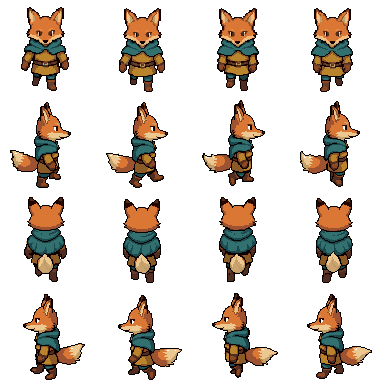
Recorded Native HD example. We designed Fox Ranger from the recorded prompt above, then used that exact PNG for a separate Native HD walk. The sheet preserves the same cloak, boots and silhouette across all four views.

Use Fox Ranger in Walk
Full-body orange pixel art fox ranger with a teal cloak and brown boots
Original 96 × 96 character PNG
Fox Ranger walk sheet with four frames for each of the south, east, north and west directions
Recorded 384 × 384 sheet · south, east, north, west · four frames per row

The north-facing steps are shorter in this example. Inspect every direction before using a new result in your game.

Pixel art character questions

What makes a good pixel art character prompt?

Describe one full-body character. Give it a clear silhouette, a few main colors, and one distinctive detail that will still read at game size.

What file do I get?

You get one transparent 96 × 96 PNG. The preview can zoom in to show individual pixels. The PNG keeps its original size.

Does character design include animation?

Character design gives you a single still image. The Walk generator turns one character image into a separate four-direction animation and sprite sheet.

Does trying an example use credits?

Viewing a recorded example or loading its prompt uses no credits. The generation button shows the cost before you submit a new design.

How do I send a finished character to the sprite sheet generator?

Choose “Use this character to make a sprite sheet” on your result. Its original PNG and description will appear in the Walk workspace. Choose your generation settings and submit the animation when you’re ready.

When should I use the free editor, Character Design, or Walk?
  • If you already have animation frames or a GIF and want to arrange or export them, open the free Sprite Sheet Maker
  • If you have a text idea and need one transparent character PNG, start in Character Design
  • If you have one character image and want a four-direction walk sprite sheet, open the Walk generator