

Sprite Sheet Tool
  • AI Generator
  • Pricing
Sprite Sheet Tool

Free browser-based sprite sheet workspace for 2D game developers.

Email

© 2026 Sprite Sheet Tool All Rights Reserved.

Ferramentas grátis em português

  • Criar sprite sheet
  • Gerar atlas de texturas
  • GIF para sprite sheet
  • Separar sprite sheet
Links
  • Pricing
  • Sprite Sheet Maker
  • Sprite Sheet Splitter
  • Animation preview
  • Sprite sheet to GIF
  • Texture Atlas Generator
  • GIF to Sprite Sheet
  • Unity Sprite Sheet Maker
  • Godot Sprite Sheet Maker
  • Contact
Legal
  • Privacy Policy
  • Terms of Service
  • Refund Policy
  • Cookie Policy
Resources
  • Guides
  • Blog
  • What’s new

Free online sprite sheet generator

Free Sprite Sheet Maker Online

Use this free sprite sheet creator to make a sheet from images or GIF frames. Arrange the layout, preview animation, and export PNG, ZIP or JSON atlas files in your browser.

Files never leave your browserFree with no signupInstant preview and export

Upload PNG, JPG, or WebP frames and pack them into a sprite sheet.

Kenney · Platformer Characters · CC0. Two supplied poses, processed locally. Clear the example to use your own artwork.

Upload frames

Drag and drop your frames here, or choose image files.

Select PNG, JPG, or WebP images. Mixed frame sizes are supported.

Sheet settings

4
2px
2px
100%
Save or load settings

Reuse layout settings without including your images.

Sprite sheet preview

Frames: 0

Upload frames to generate a sprite sheet preview.

PNG · ZIP · JSON · Phaser

Ranger example · four directions

Have a character image but no walking frames? Use the AI RPG sprite sheet generator to create a four-direction walk pack, then arrange its PNG frames in this free editor.

Generate a walk pack from your character

From supplied frames to a real sprite sheet.

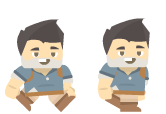
Two existing side-view poses by Kenney, arranged with the same packer and PNG exporter used by this browser editor. This demonstrates packing supplied artwork, not generating it with AI.

Two original poses
adventurer_walk1.png

adventurer_walk1.png

adventurer_walk2.png

adventurer_walk2.png

adventurer_walk1.png → adventurer_walk2.png. The example uses this supplied order; the editor does not automatically sort filenames.

Exported PNG sheet
Exported PNG sheet — 166 × 114px
Frames
2
Cell size
80 × 110
Columns
2
Spacing
2px
Padding
2px
PNG size
166 × 114px

Kenney · Platformer Characters · CC0. Only these two distinct source poses are packed; no copied frames or invented walk cycle.

Download example PNG

Centering a cell is not aligning a character.
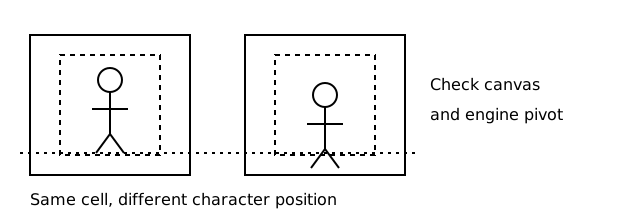
Diagram showing a smaller image rectangle centered inside the common cell; character feet and pivots need separate alignment

The widest and tallest input determine the common cell size at your chosen scale. Smaller image rectangles are centered. Keep source canvas sizes and character positions consistent, then check feet and pivots in your engine.
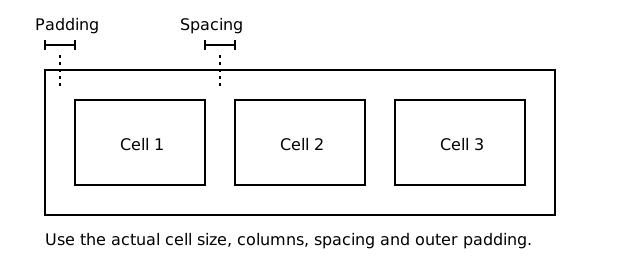
Separate gaps from outer margins.

Diagram identifying gaps between sprite cells and outer padding around a sheet

Spacing separates neighboring cells. Padding adds a margin around the whole sheet. Both change the output size; verify frame rectangles and texture filtering in the engine to avoid nearby edges bleeding into a sprite.

Build and inspect your animation

Use the complete image-to-sheet workflow, or check an existing sheet before exporting.

  • Make a sprite sheet from images
  • Preview a sprite sheet animation
  • Convert a sprite sheet to GIF

How to make a sprite sheet online

Turn separate animation frames into one game-ready sheet in three quick steps. The workspace updates locally as you change the layout.

1

Add your frames

Drop in PNG, JPG, or WebP images, or switch to GIF mode to extract animation frames in order.

2

Set the layout

Choose a grid or strip, then adjust columns, spacing, padding, scale, and background while you preview the result.

3

Export game-ready files

Download the finished PNG, individual frames in a ZIP, or generic and Phaser JSON atlas files.

Before exporting, check frame size, texture bleeding and animation timing: Choose a consistent frame sizeCheck spacing and texture bleedingPlan animation timing and holds

Everything you need to create a sprite sheet

Made for 2D game workflows

Pack character, effect, tile, and UI frames into a clean sprite sheet for Phaser, Godot, Unity, or your own engine.

Private browser-only processing

Images, GIF decoding, previews, and exports run locally with browser APIs. Your source files are never uploaded to a server.

Flexible layouts and exports

Build a grid, horizontal strip, or vertical strip, then export PNG, ZIP frames, generic JSON, or Phaser JSON from the same workspace.

Sprite sheet tools for every workflow

Sprite Sheet Animator

Preview an existing sprite sheet online. Set the grid, select an action’s first and last frames, and inspect its animation at your chosen FPS. No upload or account required.

Sprite Sheet to GIF

Convert a regular sprite sheet to an animated GIF in your browser. Cut the grid, select the animation frames, set the speed, and download a transparent GIF.

Texture atlas generator and maker

Create a free texture atlas from game frames. Pack a PNG atlas in your browser and export generic or Phaser JSON metadata—no upload required.

GIF to sprite sheet

Convert a GIF to a sprite sheet in your browser. Extract frames, keep frame order and timing, preview animation, and export game-ready assets.

Sprite sheet cutter and splitter

Split an existing sprite sheet into frames with rows, columns, or fixed frame size controls in one browser workspace.

Unity sprite sheet maker

Pack existing frames into a PNG in your browser. Download a real two-pose example and follow Unity Sprite Editor import, grid slicing and result checks.

Godot sprite sheet maker

Upload PNG/WebP sprites or an Aseprite PNG and JSON pair, map four-direction walk and idle animations, and download a free playable Godot 4 character with movement and collision. Files stay in your browser.

Sprite sheet maker FAQ

Is this sprite sheet maker free?

Yes. Images and GIF modes can export a PNG sheet, individual PNG frames in a ZIP, or a ZIP containing PNG and generic or Phaser JSON. Splitter mode exports individual PNG frames in a ZIP. All processing stays in your browser, with no signup required.

Are my images uploaded?

No. Image loading, GIF decoding, splitting, preview, and export all happen locally in your browser.

Which image formats work?

The workspace supports PNG, JPG, and WebP frames, plus animated GIF for frame extraction and existing sprite sheets for splitting.

How do I create a sprite sheet online?

Choose images or a GIF, adjust the grid, spacing, and padding, then export the finished PNG sheet. You can also download ZIP frames or JSON atlas metadata from the same workspace.

Can I use the exported sprite sheet in Unity, Godot, or Phaser?

Yes. Export a regular PNG grid for Unity or Godot, generic JSON for a custom loader, or Phaser JSON for a Phaser texture atlas workflow.

How is animation frame order decided?

Images keep the order supplied by your file picker or drag-and-drop selection; filenames are not automatically sorted. Grid frames fill from left to right, then top to bottom. GIF frames keep their extracted order. Check the animation preview before exporting.

What happens when my frames have different sizes?

The widest and tallest imported frames determine a common cell size at your selected scale. Smaller frames are centered inside each cell. For a steady animation, use consistent source canvas sizes and character positions, then check the pivot in your game engine.

How do spacing and padding affect the sheet size?

Spacing is the gap between cells; padding is the outer margin around the sheet. Sheet width = 2 × padding + columns × cell width + (columns − 1) × spacing. Use rows and cell height for the height calculation. For example, 12 frames with 128 × 128 cells, 4 columns, 2px spacing and no padding produce a 518 × 388px sheet.

Why does my animation jump between frames?

Check the source canvas size, character position, frame order and engine pivot. Smaller images are centered in a common cell, which does not guarantee that the character stays in the same position.

Why do nearby sprite edges appear in my game?

Check the frame rectangles, spacing, outer padding and texture filtering in your engine. Spacing separates cells; padding adds an outer margin. The correct settings depend on your importer and filtering mode.