Phaser Sprite Sheet vs Texture Atlas: Which Loader Should You Use?
Use this.load.spritesheet() when you know the PNG's uniform cell dimensions and gaps. Use this.load.atlas() when a matching JSON file describes named frame rectangles. The image can look similar in both cases; the loader contract and how you address frames are different.
The examples below use Phaser 3.90.0 and the same two CC0 poses from Kenney Platformer Characters. You can run both loaders side by side and see where a two-pixel gap changes the setup. These two poses are enough to check loading; they do not make a complete walk cycle. The code has not been checked with Phaser 4.
One set of drawings, two exports
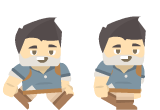
Each source image is 80 × 110 pixels. The free editor's real packer and PNG exporter produce these two layouts from those same inputs:
| Zero-gap PNG grid | PNG + Phaser hash JSON |
|---|---|
| 160 × 110; two columns of 80 × 110 cells. Margin 0; spacing 0. | 166 × 114; the same two 80 × 110 frames. Outer padding 2 px; spacing 2 px. |
load.spritesheet; the first pose is numeric frame 0. | load.atlas; the first pose is named frame adventurer_walk1.png. |
Download the grid PNG, atlas PNG and matching Phaser JSON. The grid download has “unity” in its filename because it is also used in our Unity example. It is a plain PNG; Phaser can read it with the cell sizes above.
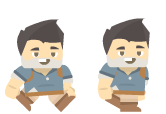
The atlas's first rectangle is (2, 2, 80, 110) and its second starts at (84, 2). The JSON carries those coordinates. The grid's frames start at (0, 0) and (80, 0) instead. Keep the PNG and its layout settings or JSON together.
Run both loaders side by side
Download the runnable HTML. Put it and the three asset files above in one folder. The HTML expects phaser.min.js beside them. Install the pinned engine and copy that bundle, then serve the folder:
npm install --no-save phaser@3.90.0
cp node_modules/phaser/dist/phaser.min.js ./phaser.min.js
python3 -m http.server 8000
Open http://localhost:8000/phaser-loaders.html. The HTML includes the script tag and page containers; its exact inline program is:
new Phaser.Game({
  type: Phaser.CANVAS, width: 400, height: 260, parent: 'game', transparent: true,
  scene: {
    preload() {
      this.load.spritesheet('grid', './adventurer-unity-sheet.png', {
        frameWidth: 80, frameHeight: 110, margin: 0, spacing: 0
      });
      this.load.atlas('atlas', './adventurer-sheet.png', './adventurer-sheet.phaser.json');
      this.load.on('loaderror', file => {
        document.querySelector('#status').textContent = `Could not load ${file.src}`;
      });
    },
    create() {
      this.add.image(100, 65, 'grid', 0);
      this.add.image(100, 195, 'grid', 1);
      this.add.image(300, 65, 'atlas', 'adventurer_walk1.png');
      this.add.image(300, 195, 'atlas', 'adventurer_walk2.png');
      document.querySelector('#status').textContent = `Grid: 0, 1. Atlas: adventurer_walk1.png, adventurer_walk2.png. Phaser ${Phaser.VERSION}`;
    }
  }
});
You should see pose 1 above pose 2 in each column: grid frames on the left and atlas frames on the right. Both columns should show the same crops. If one column is shifted or contains a slice of its neighbor, check its margin and spacing before changing the sprite positions.
Both loaders queue assets in preload(). Phaser calls create() after that queue completes, so the image objects are created there. The official Phaser loader guide explains loading and the LoaderPlugin API documents the individual methods.
Use your own export
In the texture atlas tool, choose Phaser atlas · PNG + JSON (ZIP). Extract sprite-sheet.png and sprite-sheet.json, then load that pair:
// In preload():
this.load.atlas('hero', './sprite-sheet.png', './sprite-sheet.json');
// In create(), after checking your JSON frames object:
this.add.image(100, 100, 'hero', 'adventurer_walk1');
The editor removes input extensions and makes names unique. Uploading adventurer_walk1.png produces the key adventurer_walk1; the fixed sample downloads in this article keep .png. Copy your exact frames keys rather than assuming either naming rule. The texture key hero is your loader identifier; the frame key identifies a rectangle within it.
If you choose a plain PNG instead, set frameWidth, frameHeight, margin and spacing from that exact layout. For these two padded atlas images, a grid loader would need frameWidth: 80, frameHeight: 110, margin: 2, spacing: 2. Loading them with zero gaps would start two pixels too early. JSON avoids repeating those rectangle calculations in game code.
Diagnose the error you actually see
- The whole sheet appears: it was loaded as an ordinary image. Use
spritesheetoratlasto define subframes, then select a frame when creating the object. - A frame is missing: check the texture key, then copy an exact JSON frame name. Numeric
0is a grid frame index;'adventurer_walk1.png'is an atlas frame name. They are not interchangeable. - Every crop is shifted: compare cell size, margin and spacing with the export. An irregular tightly packed atlas cannot be recovered by guessing a regular grid; use its original metadata.
- JSON loads but the atlas does not: inspect both requests in the Network panel.
load.atlasreceives separate PNG and JSON URLs. Keep them from the same export; check the server path, response type and CORS if they are on another origin. - The JSON has a
framesarray: this tool's generic JSON is intended for a custom loader. Select the Phaser atlas download forload.atlas; renaming a generic file does not change its schema.
Correct crops can still show sampling artifacts when scaled. See the padding and texture bleeding explanation before changing coordinates to compensate for a filtering problem.
The loader does not choose your animation
Both paths create frame textures. Neither automatically defines which poses belong to a walk, their order, their duration or whether an action loops. Build a Phaser animation from an explicit ordered list after loading; do not animate the entire atlas just because every frame is present. A mixed atlas may include characters, terrain and UI.
The browser preview may retain GIF delays, but its PNG and atlas JSON exports contain no animation timing track. Use the animation timing article when deciding FPS and holds.
Choose a grid when the geometry is regular and stable. Choose a matching atlas when frame names and exported rectangles make the consuming code clearer. For the broader format decision, read PNG sprite sheet versus JSON atlas. To make a new matching pair, return to the atlas generator; to arrange supplied images without metadata, use the free sprite sheet maker.
Table of Contents
Author
Categories
Tags
More Posts

What Is a Sprite Sheet? Frames, Animation and Atlas Data
See how separate sprite frames become one image, how a game plays them, and when you need a regular grid or a JSON atlas.
Why Does My Sprite Character Change Between Directions?
Separate character changes from frame alignment and playback problems, then check the reference, equipment and each direction before using an AI walk cycle.
Sprite Animation Timing: Choose FPS Without Losing Holds
Plan sprite animation FPS, loop duration, and per-frame holds with simple timing math, then carry those choices into your game engine.